




24 May 2017 14:30 (UTC)
Explore the complex world of racing steering wheels
We explore one of the most important parts of the cars - the steering wheel. Find out more about what the drivers use in the cockpit of both Indycar and F1 challengers.
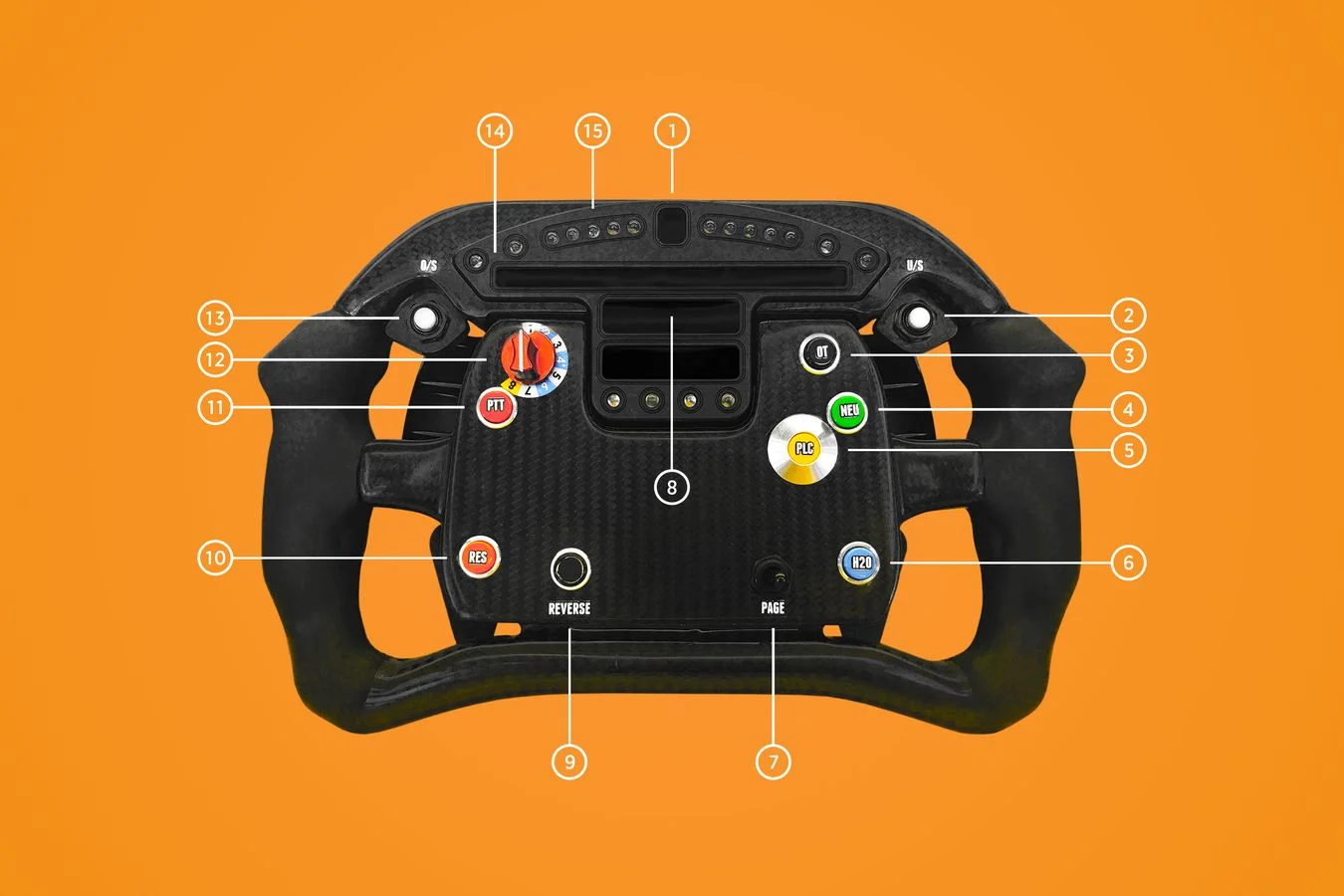
1. Small readout indicates gear. Typically drivers swap between fifth and sixth at Indy, depending on conditions 2. [White] ‘O/S’ button or weight jacker – left weight 3. ['OT' top right] Overtake button aka Push to Pass. Not used on ovals 4. [Green 'NEU'] Neutral button used when stopping in the pits 5. [Yellow 'PLC'] Pit lane speed limiter button. A 60mph limit operates at Indianapolis 6. [Blue bottom right] ‘H20’ or drink button. Pumped from bottle in sidepod 7. [Black 'PAGE'] Toggle adjusts display 8. Three display screens. Top one relays engine information, others can be programmed for different parameters, such as lap time and fuel info 9. [Bottom left] Reverse button – hopefully not required at Indianapolis! 10. [Orange ‘RES’] Reset button for alarm and fuel. Pressed each time the car is refuelled in the race 11. [Red ‘PTT’] radio button, aka Push to Talk 12. Rotary Wheel adjusts the Honda engine’s mapping for different situations such as fuel saving and caution periods 13. [White] ‘U/S’ button or weight jacker – right weight 14. Alarm lights. Warn if engine temperatures are too high, etc 15. Shift lights. Go from green to red, telling driver when to shift gear
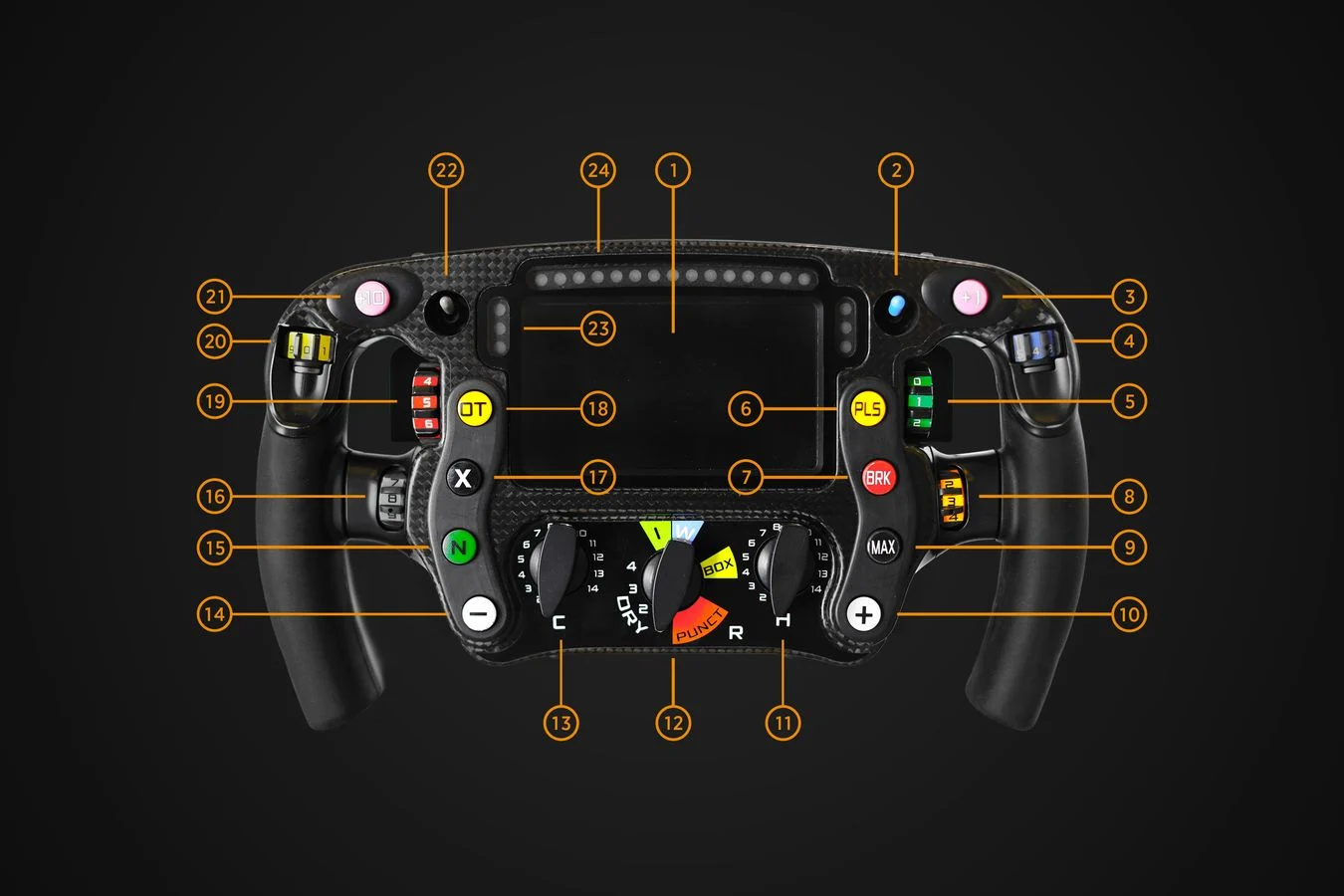
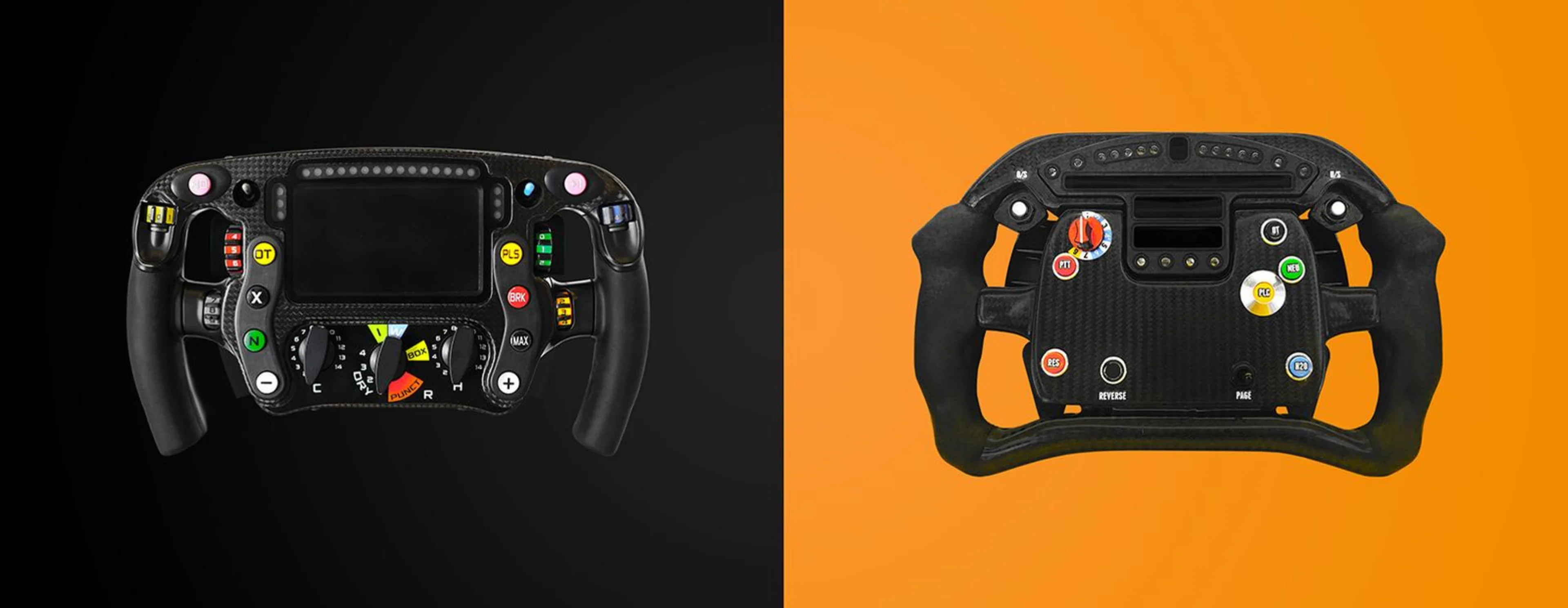
1. The PCU8 screen, a standard item used by all teams. Displays multiple sources of information on request by ALO. Changes colour when coloured buttons are being used 2. Launch map toggle used by ALO for start. Car has to stay in that map until first pit stop 3. [Pink + 1 button] Used by ALO to choose further functions 4. [Blue on top right] Controls level of brake balance 5. [Green on right] Further refines torque balance under braking – adjusted for various types of corners around the lap 6. [Yellow PLS at right] Pit-lane speed-limiter. Set to 80 km/h, or at 60 km/h for some venues. 7. [Red at right] Spare button. Used for example for stopping MGU-K deployment under blue flags to save energy – aka ‘anti-overtake’ 8. [Orange on right] Torque switch, used for engine braking 9. [Black Max] For different power unit modes – used for a few laps, unlike OT, which is for short bursts 10. [White + button] Used by ALO to choose further functions 11. [round dial bottom right] Multi-function – 14 switch positions provide a different functionality which is further sub-divided by the white - and + buttons 12. [Green I and Blue W] I and W turn on rain light, and tell the car it is on intermediates or wets, as different diameters impact pit speed limiter. Diff functions can also be linked to this. [Yellow Box] Box. Confirmation that the driver is coming to the pits, in the event of radio failure. [Red Punct] Puncture. Switches to settings that protect the gearbox and the differential as the car is returning to the pits. [Round control bottom centre] R switch, aka ‘Tyre’. 13. [round dial bottom left] Multi-function – 14 switch positions provide a different functionality which is further sub-divided by the pink +10 and + 1 buttons 14. [White – button] Used by ALO to choose further functions 15. [Green N] Neutral. Used coming into pits in practice, arriving at grid, when parking car, etc 16. [Silver] Additional diff control switch 17. [Black X] Accesses defaults, for example to turn off a failed sensor. Used to confirm functions 18. [Yellow OT] Overtake or ‘OT’ button. Used by ALO to adjust deployment to help with attacking or defending 19. [Red left next to OT] Differential control switch – adjust stability 20. [Yellow top left]: Raises and lowers engine deployment 21. [Pink +10 button] Used by ALO to choose further functions 22. [Grey Toggle next to triple lights on left] Radio toggle, aka ‘PTT’ or push to talk 23. [Left and right triple lights] Blue flag, yellow flag, and red flag lights in pairs, controlled by FIA. Team can also use light combinations to send messages to ALO 24. Shift lights. Five reds (in middle) and five blues (at right). ALO shifts when it turns blue. Also five greens on left for other uses